如何读懂 Amazon PPC 报告:8 个要点
How to Read Amazon PPC Reports: 8 Essentials Every Seller Should Know
文章介绍阅读 Amazon Ads 报告的 8 个要点。Amazon 归因窗口一般为 7 至 14 天,取决于广告类型与账户类型,作者建议拉取至少 14 天前的数据,例如分析 5 月整月数据要等到 6 月 15 日。

Reading Amazon Ads reports well is very different from running a campaign. But it is not any less important.
Amazon PPC Reports can quickly become overwhelming for sellers downloading them for the first time. And even as an experienced seller, there is always something new to learn about Ad campaign optimization.
We wrote this article to cover 8 selected essentials that make our everyday job easier. Having a framework is just as important as targeting relevant keywords. You can’t do one without the other, since both make the important decisions that affect your budget.
1. Amazon Attribution Window: When Is the Data Ready?
Amazon’s attribution window generally runs from 7 to 14 days. This is when a sale can be directly attributed to the specific click on your ad from one customer.
- Note: The exact duration of the attribution window depends on the ad type and account type.
There are products that people buy without having a second thought. This includes stuff like coffee, dish soap, detergent, paper towels, batteries, toothpaste, etc. People buy these the same day they search for them.
On the other hand, products like laptops, televisions, clothing, or supplements usually have much longer conversion periods. Sometimes from 5 to 10 days. This is because, before deciding on a product, shoppers in these categories usually read reviews, compare listings, leave and come back.
This means the average conversion period depends on what you sell. Meanwhile, the attribution window starts after a click happens. From there, shoppers have 7 to 14 days to make a purchase in order for Amazon to attribute the sale to their click before the window closes.

Consider the Average Conversion Period for the 30-Day Report
If you want to analyze performance for an entire month, download the reports AFTER the attribution period AND the average conversion period have passed. In general, pull data that is at least 14 days old. For example, if you want fully attributed data for the whole month of May, wait until June 15th to pull the report.
If you know your specific category has a shorter conversion period, you can adjust this window. Keep in mind that only fully attributed data is 100% up to date. While data from the last few days of a window rarely changes significantly, it still depends on your category.
Our guide on how often to optimize Amazon PPC campaigns expands on that specific topic.
2. Types Of Amazon PPC Reports
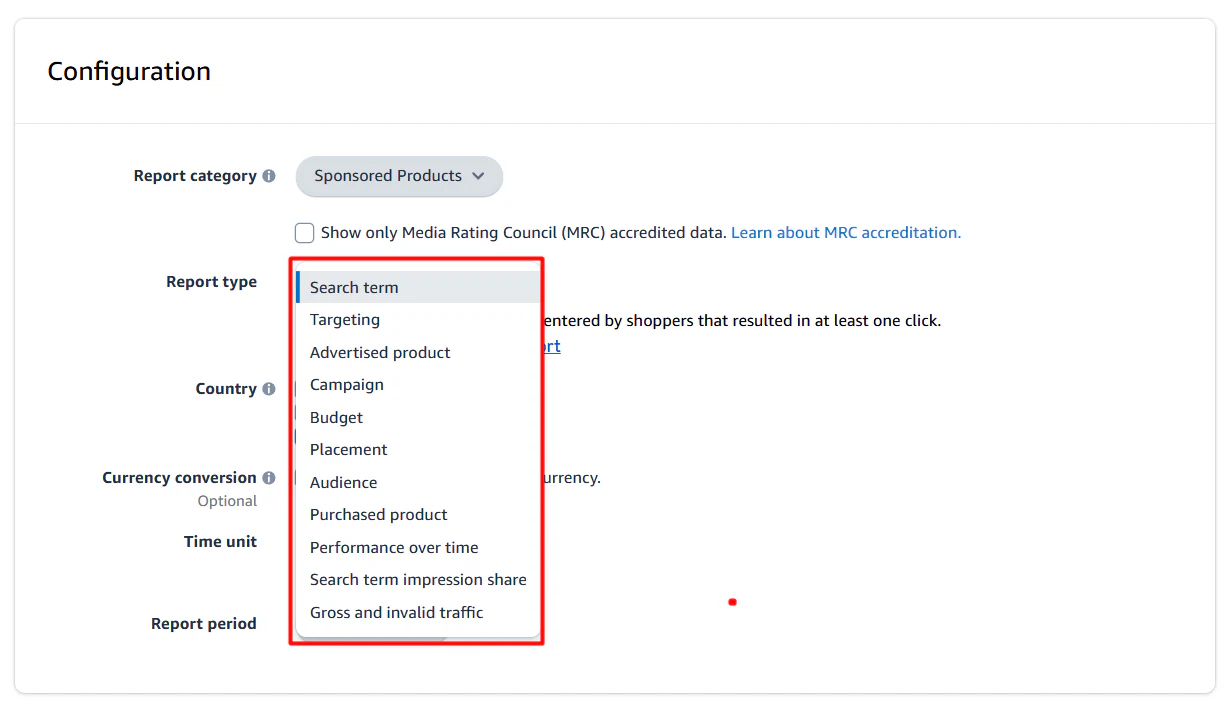
Amazon offers several report types. Here are the most relevant:
Advertising Report
This report shows overall performance across your Sponsored Products campaigns.
Amazon Search Term Report
This report shows the shopping terms customers entered that produced at least one click on your ad.
Placement Report
This report shows how your ads performed in top of search, rest of search, product pages, and Business placement.
Targeting Report
This report shows sales metrics for every keyword and product target that received at least one impression.
Performance Over Time Report
Performance Over Time summarizes clicks and spend across a date range and shows how average cost-per-click and total spend moved.
Search Query Performance Report
This one is in Brand Analytics, and you need Brand Registry to get it. It shows impressions, clicks, and purchases at the query level across paid and organic.
3. Key Amazon PPC Metrics
Here’s a glossary of the most important metrics when optimizing PPC campaigns:
Impressions
An impression counts each time your advertisement appears on a shopper’s screen.
Clicks
A click is registered whenever a potential customer selects your ad.
Click-Through Rate (CTR)
Clicks divided by impressions. CTR is the percentage of shoppers who click your product advertisement after seeing it on their screen
Cost-Per-Click (CPC)
Spend divided by clicks. This is an average of what you actually paid for every single click. Crucial for the Amazon attribution window.
Spend
Amazon ad spend is the total amount of money you are charged when shoppers click on your Amazon Advertising campaigns.
Conversion Rate
Orders divided by clicks. An Amazon Ads conversion rate (CVR) is the percentage of ad clicks that result in a customer purchasing your product.
ACOS (Advertising Cost of Sale)
Ad spend divided by attributed ad sales. Amazon ACOS (Advertising Cost of Sale) is the percentage of ad revenue you spend on advertising to generate those sales.
ROAS (Return on Ad Spend)
ROAS (Return on Ad Spend) on Amazon Ads measures how much revenue your ad campaigns generate for every dollar you spend.
TACOS (Total Advertising Cost of Sale)
TACOS stands for Total Advertising Cost of Sales. A “good” TACOS rate on Amazon generally falls between 5% and 15%, with 6% to 10% considered the ideal target for most established products.
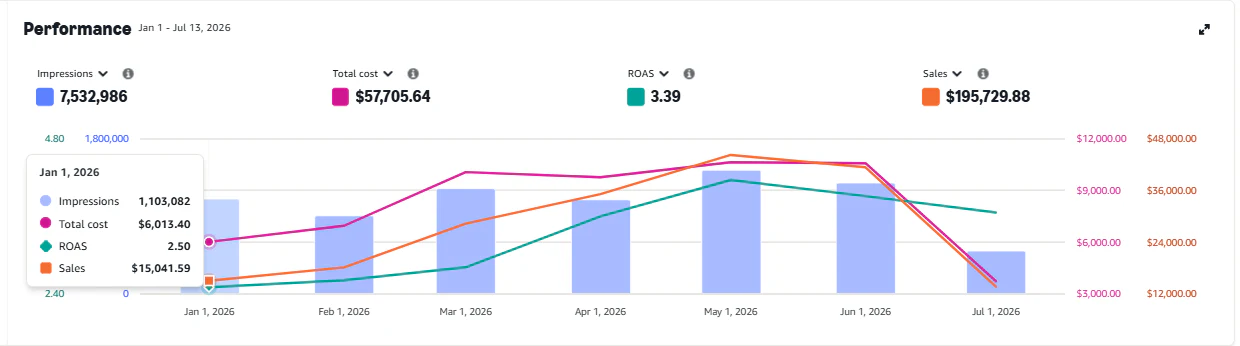
4. The Most Common Amazon PPC Data Findings
Keyword with High ROAS & Low Spend
When you’re analyzing reports and looking for ways to improve efficiency, you’ll likely see keywords with a very high ROAS, which instantly become major candidates to be in more important campaigns. But always look closer.
Sometimes that keyword with excellent ROAS has almost no spend. For example, if you spent $2 on the keyword and a customer bought three units, the ROAS will look astronomically good, but you don’t have enough data yet to identify that result as a pattern.
For keywords with high ROAS and low spend, harvest them into their own exact-match campaigns to see if the results repeat. Set a minimum spend and analyze performance before you bid more.
Related article:
Sudden ACOS Spikes
When you review your campaigns and see ACOS jump 20% to 30%, look closer before changing your bids.
Sometimes the cause is not inside your campaigns. For example, if a competitor drops their price, shoppers keep clicking your ad at the same rate, but more of them buy the cheaper option. Cutting bids in that situation would only reduce your visibility.
For sudden ACOS spikes, review competitor pricing, your Buy Box status, stock levels, recent reviews, etc. Once you identify the cause, decide whether to lower the bids or not.
Zero Impressions
A campaign with zero impressions is usually related to Featured Offer status, stock levels, or failed payments.
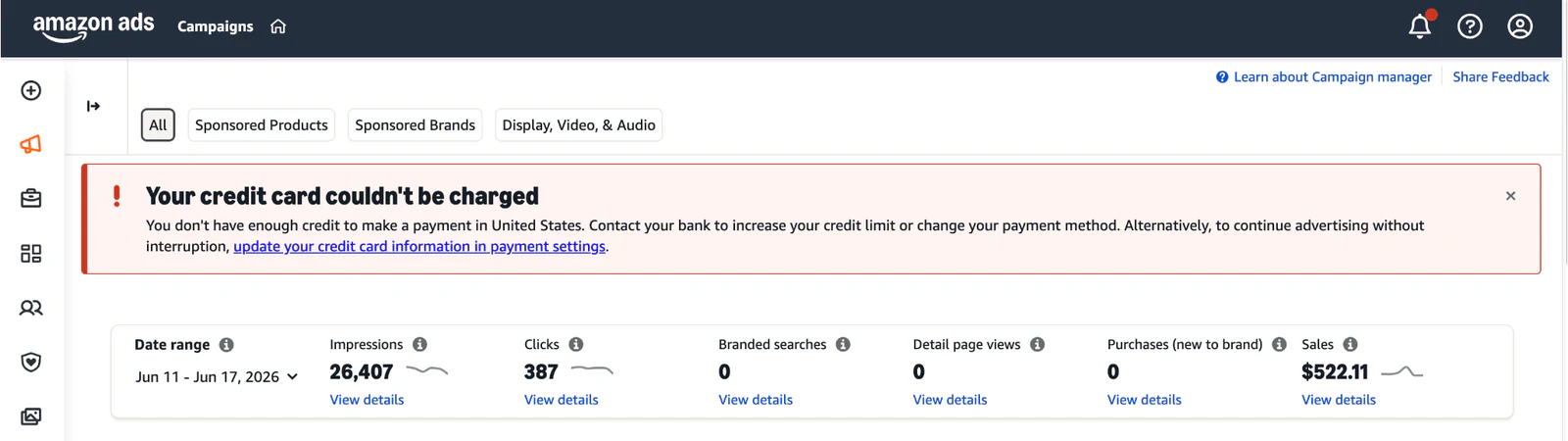
It can also happen if your bid levels are simply not high enough.
Some categories are highly competitive and expensive. If your bid is too low, you will get little to no impressions because your bid isn’t competitive in the auction.
Use Amazon’s suggested bids as a reference, then adjust based on your data and campaign goals.
Also, if you do get a small number of impressions, they may still be low-quality traffic. To fix this, you will likely need to increase your bids to access better placements and drive more meaningful volume.
5. What Is A Good ACOS On Amazon?
Plenty of content repeats that a healthy account runs at 30% to 35% ACOS. But this doesn’t apply to every category on the platform.
Supplement sellers, for example, usually accept a much higher ACOS on specific keywords to buy organic position. This is a very common practice in highly competitive categories.
So the ideal ACOS depends on your current objective and the category you operate in.
You should also evaluate ACOS differently depending on your tactic. Your branded ACOS will look very different from your competitor or category targeting ACOS.
While you can use a blended ACOS target for full account performance, it is best to set a target range for different tactics.
6. Amazon Search Term Report Analysis
Use the Amazon Search Term Report biweekly or monthly. With it, you can:
- Find Wasted Spend in keywords with zero sales and decent spend.
- The terms with zero sales are negative keyword candidates. If a term is clearly irrelevant to your product, negate it early to stop wasting spend.
- Find keywords to harvest if they have an ACOS that works for you (collect more data if spend is too low).
- Find terms converting badly. These are keywords that convert but are expensive. In these cases, decide whether building organic ranking relevancy for this keyword is worth the inefficiency.
- Evaluate the spend-to-sales ratio for each keyword. For example, if a keyword accounts for 10% of spend but only 5% of sales, review whether your bid is too high or the budget needs changes. You might accept this inefficiency if it is a core category keyword you want to rank for.
- Find opportunities to scale. If a keyword uses 2% of spend but brings in 8% of sales with strong conversion rates, scale it by increasing bids (if ACOS allows) or shifting more budget to support it.
Always read and evaluate each item based on the tactic and your account strategy.
Related article:
7. How to Approach Traffic Spikes
Many times you will find that your products had traffic spikes that were unexpected. Maybe it was a seasonal period that affected your brand and you didn’t know about it, or maybe it was something else.
Either way, you can use that new data to improve your ad campaigns.
One of our clients appeared on television and advertised their brand. As a result, traffic jumped for three or four days.
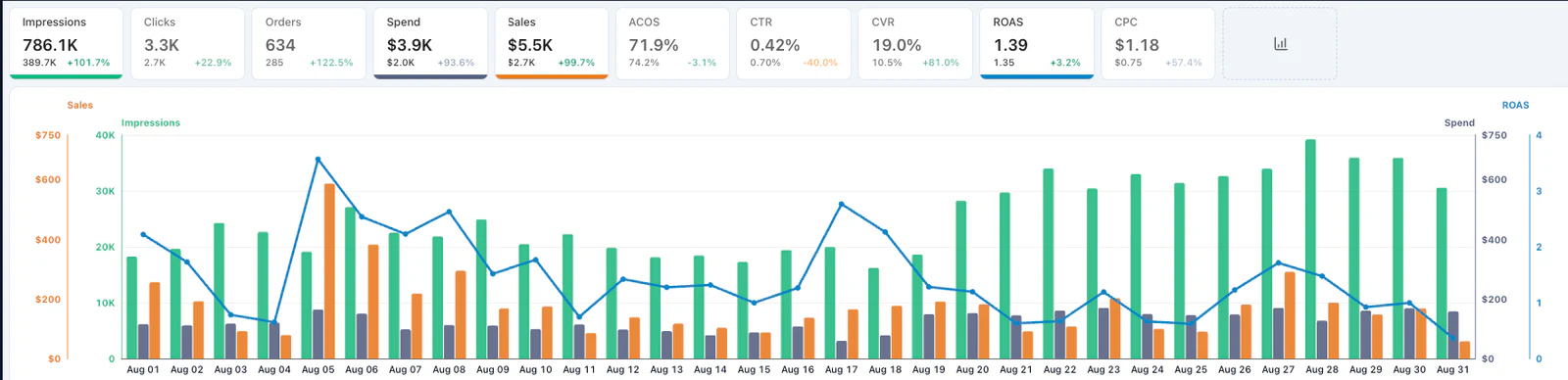
We took that opportunity to extract the search terms that converted during that period, and several of them turned out to be terms getting almost no spend on normal days. Of course, we started funding them from that moment onward.
This method works for any traffic spike.
The idea is to isolate the higher-traffic period and pull the terms that converted during it. Then, check if those terms need a boost on normal days.
The most important rule here is to not be reactive. Try to identify the cause first and figure out the next steps. Maybe it is time to increase bids, or maybe you realize the keywords you’ve been bidding heavily on don’t actually compound into more visibility, so you need to lower some bids.
Context and patience are crucial here.
Frequently Asked Questions About Amazon PPC Reports (FAQs)
What is the Amazon attribution window?
It is the period during which Amazon credits a sale back to an earlier ad click. For sponsored ads, it is typically between 7 to 14 days, and depends on the ad type being measured as well as your Amazon account type (seller vs vendor).
How often should I check my Amazon PPC reports?
Check daily for account health, weekly or biweekly for bid and budget optimization, and check monthly for search term and placement analysis.
How far back do Amazon advertising reports go?
It depends on where you are looking and how much detail you need:
- Downloadable Reports: Detailed reports from the Report Center (like search term or purchased product reports) go back 60 to 95 days, depending on the specific report type.
- Campaign Manager: The ads dashboard offers a higher-level view and can show aggregated performance data for up to two years, or even a “lifetime” view for overall campaign metrics.
- AMC & API Connections: Advanced setups like Amazon Marketing Cloud (AMC) and API connections can retain up to 24 months of historical data.
Why did my ACOS spike suddenly?
A competitor price drop, a lost Featured Offer or an out-of-stock ASIN can all move ACOS without anything changing in your campaigns.
Should I pause a keyword with no sales?
Not on a handful of clicks. Wait for 15 to 20 clicks on exact match and 10 to 15 on broad before deciding, unless the term is irrelevant to your product.
Also, make sure you evaluate this data over a condensed timeframe, such as 14 to 30 days. 20 clicks spread out over a year is not the same as 20 clicks in one month.
Ready to Make Your Amazon PPC Data Work Harder?
Amazon PPC reports can show you where your budget is working and where new opportunities are hiding. But turning that data into the right campaign decisions takes experience.
Fill out the form below and tell us about your Amazon business. One of our eCommerce experts can review your goals and share practical ways to improve your PPC strategy.
No pressure. Just clear advice based on your business.
来源:bellavix · bellavix.com