如何记录清货托盘到货差异:保留订单与清单并逐项对应证据
How to Document a Liquidation Pallet Delivery Discrepancy
记录清货托盘到货差异,需先保留订单与装箱清单,按实际收货登记,再把每个争议商品或数量对应到具体清单行和照片,并遵循实际卖家的申报指引与截止期限。Amazon US Liquidation Auctions 条款规定五天检查/申报期并要求商品级差异文件,但该规则不适用于其他卖家。完整证据记录可支持审核,但不保证获赔。
By Zeeshan · Last updated November 5, 2026
Direct answer: Document a liquidation delivery discrepancy by preserving the order and manifest, recording the shipment as received, then linking each disputed item or count to a specific manifest row and photograph. Follow the actual seller’s reporting instructions and deadline. A complete evidence record supports review; it does not guarantee reimbursement.
A close-up of a crushed corner can show a problem while leaving the reviewer unable to identify the shipment. A spreadsheet can show a shortage while leaving the unit definition unclear. The useful record connects the order, packaging, item and stated discrepancy without making the reviewer guess which piece belongs where.
Our return-pallet buying overview covers the sourcing decision. Here the question is narrower: how to preserve an understandable receipt record after a purchase.
In this guide
- Which reporting rules govern this order?
- What should you record when the shipment arrives?
- How do you connect a detail photo to the right item?
- How should the quantity comparison be recorded?
- What makes a discrepancy log understandable?
- What should the report ask the reviewer to resolve?
- How do you keep the record useful after reporting?
- Frequently asked questions
Which reporting rules govern this order?
Locate the actual order confirmation, listing, freight documents and seller or marketplace reporting instructions. Record the applicable deadline, how it is calculated and where a report must be sent. Do that before a lengthy sorting session. Do not substitute the normal consumer return policy for liquidation terms.
For example, the Amazon US Liquidation Auctions terms specify a five-day inspection/reporting period and require item-level discrepancy documentation. That particular rule does not establish another seller’s deadline or the outcome of your claim. Read the terms attached to your own transaction.
What should you record when the shipment arrives?
Work within the carrier’s process and the site’s receiving instructions. Keep handling safe and do not climb onto pallets or open suspicious packages for a better photograph. Record the shipment reference, arrival date, number of pallets or cartons and visible packaging condition as accurately as the situation allows.
- A wider view connecting the visible shipment to its identifying reference.
- Views of accessible sides, wrapping and the area of concern.
- Relevant delivery-document notes made through the carrier’s normal process.
- An explanation of anything you could not inspect at receipt.
Keep original files private, including labels needed for the claim. If you later share an example publicly, make a separate redacted copy rather than destroying the original evidence.

How do you connect a detail photo to the right item?
Use a simple local evidence identifier, such as Item A, consistently in your private log and filenames. Record the manifest row, model or item identifier and the file showing that item. Take a context view before a tight close-up, so the detail can be related to the whole object.
Describe only what is visible: a torn carton, bent bracket or absent listed accessory. Do not turn a packaging mark into a diagnosis of internal damage. If function has not been safely checked by a qualified person where needed, write not tested. Keep statements about cause separate from observations.


How should the quantity comparison be recorded?
| Expected record | Observed record | Evidence link |
|---|---|---|
| Manifest row and stated unit | Count using that same unit | Count sheet and overview photograph |
| Listed accessory | Present, absent or not yet checked | Item-specific view |
| Described condition | Specific observed difference | Context plus detail images |
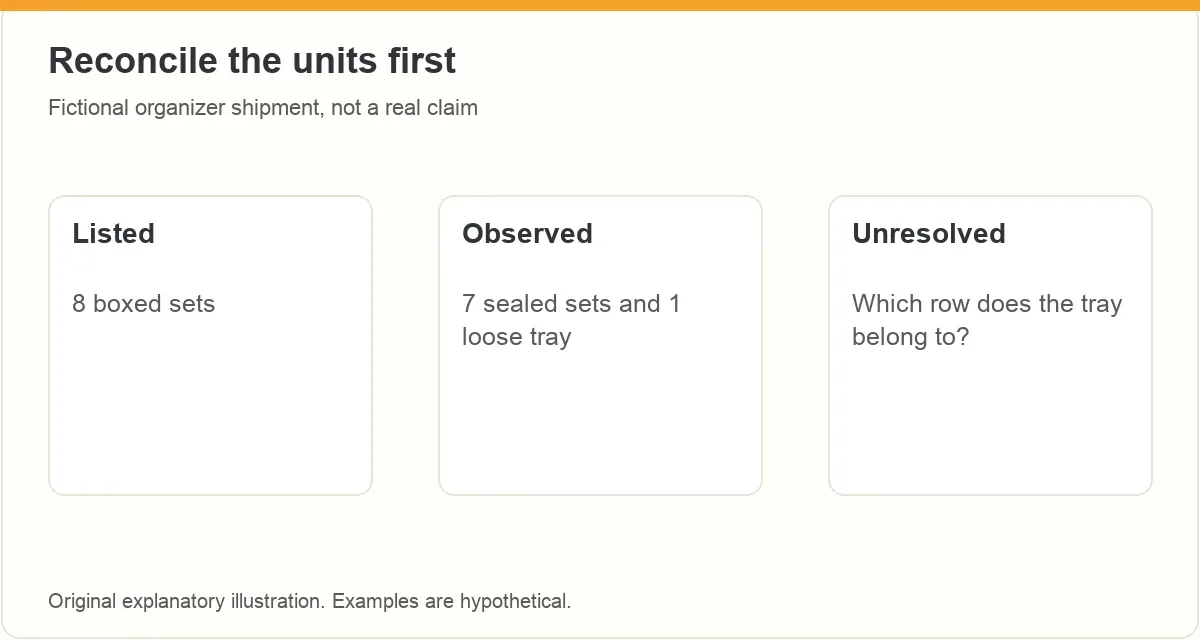
As a fictional example, an order lists eight boxed organizer sets, but your receipt log records seven sealed sets and one loose tray. Do not write one missing set as a settled conclusion until you have reconciled whether the tray belongs to an incomplete set or a different manifest row. State the observed count and the unresolved identity separately.
What makes a discrepancy log understandable?
Use one row per concern and keep different issues separate. A quantity issue, an accessory issue and a cosmetic concern may need different evidence even when they involve the same product. Include the order identifier, manifest row, expected description, observed fact, evidence files and any testing limitation.
Preserve the original listing and manifest version. If the marketplace supplies a corrected record, keep both with their dates. Do not overwrite the source to make it agree with your count. Check sums and units before submitting; a pack-versus-piece mistake can make an otherwise clear report confusing.
What should the report ask the reviewer to resolve?
Start with the order and the specific discrepancy. State what you expected from the listing, what you observed and which files support that difference. Use the seller’s required reporting channel and request the applicable review process. Do not promise yourself a refund from a generic policy summary.
Keep the goods, packaging and original records as the actual terms require. Avoid unauthorized returns or disposal while the review is unresolved. If an item presents a safety concern, stop handling it and follow the appropriate safety and seller instructions; this evidence guide is not a testing procedure.
How do you keep the record useful after reporting?
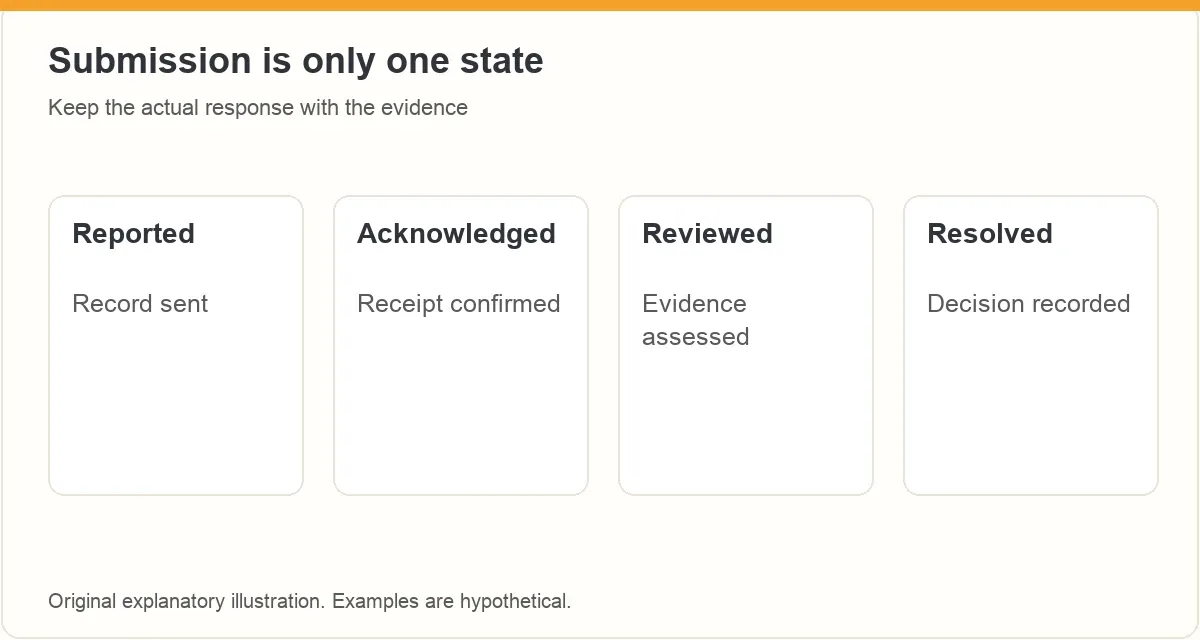
Save the submitted report, attachment list, confirmation and subsequent replies together. Track reported, acknowledged, reviewed and resolved as separate states. A sent email or uploaded photograph is not acceptance of the claim. Record the actual decision and its scope when it arrives.
Use the outcome to improve future document checks, without assuming every return lot behaves the same way. A creator path using products you already own is a different decision from buying stock; ACE training is an optional starting point for exploring that route, not a claims service.
Frequently asked questions
Does damage to a box prove the product is damaged?
No. Record packaging condition and product condition separately. Avoid diagnosing unseen damage from a carton photograph.
Is there one reporting deadline for all liquidation orders?
No. Check the listing and transaction-specific terms, including how days are counted and which reporting channel is required.
Should I publish the shipping labels as proof?
Preserve originals privately for the appropriate reviewer. Use separately redacted copies for public examples so personal or confidential information is not exposed.
Does a completed report mean the claim was accepted?
No. Submission, acknowledgment, review and resolution are separate states. Keep the actual response with the record.
What should you do next?
Make it easy for the reviewer to follow one discrepancy from the original listing to the received item. Clear evidence supports a decision without presuming what that decision must be.
ZonBase is an Amazon product research suite with tools for product research, keywords and supplier grading. Its Zon Grading tool takes a list of products by UPC or ASIN, such as a supplier list, and uses your cost to estimate the margin on each item before you commit money to stock.
For more on this, see how to read a return pallet manifest before buying, the SellerAmp vs ZonBase wholesale buying checklist and the best wholesale websites for Amazon sellers.
Keep sourcing and market research connected
Explore ZonBase when evaluating product research tools. Keep supplier condition checks, freight records and claim decisions with their actual source documents.
ZonBase is separate from Amazon. Product research does not verify supplier condition, selling eligibility or future sales.
来源:zonbase · zonbase.com